Optimizing SEO in PrestaShop Themes: Best Practices for Search Engine Visibility
Download MarkDown

PrestaShop Search Engine Optimization: 2026 Checklist
PrestaShop search engine optimization in 2026 hinges on five technical pillars and four content pillars. PrestaShop’s default configuration ships closer to SEO-ready than Magento or OpenCart, but the gap between out-of-the-box and “actually ranking” is significant — and the gap widens once your catalog exceeds a few hundred SKUs. The five technical pillars are: a fully responsive mobile theme (Google’s mobile-first index has been the default since 2021 and PrestaShop themes still ship with mobile gaps), clean canonical URLs that respect attribute and combination filters, fast Largest Contentful Paint on category and product pages, structured data for Product, BreadcrumbList and Review schema types, and a working hreflang implementation if you sell across regions. The four content pillars are: unique, depth-driven product descriptions (not manufacturer copy), category landing pages that read like buying guides rather than thin SKU lists, well-tagged image alt attributes, and category-to-product internal linking that distributes equity downstream.
The single biggest mistake we see on PrestaShop stores: attribute-driven URL bloat. A catalog of 500 products combined with 4 attributes (color, size, material, brand) and faceted filtering can produce tens of thousands of indexable URLs, all serving near-identical content. Google has a “duplicate content with canonical chosen by user” warning that surfaces in Search Console weeks after a launch — usually after rankings have already started to slip. Setting noindex on filter URLs while keeping them follow for crawl-equity preservation solves this. Combined with strong canonical tags pointing to the parent category, this is the single fix that recovers the most lost rankings on PrestaShop stores in our audit work.
The rest of this post walks through each of these pillars in detail. If you’re auditing an existing PrestaShop store, read the technical sections first; if you’re launching a new store, the content section sets the foundation that the technical work amplifies.
In today’s competitive online marketplace, search engine visibility plays a critical role in the success of any eCommerce website. PrestaShop, a widely used open-source eCommerce platform, offers a variety of customizable themes to build visually appealing online stores.
However, to maximize traffic and conversions, it is essential to optimize your PrestaShop theme for SEO (Search Engine Optimization). In this blog, we will explore best practices to improve search engine rankings and drive organic traffic to your PrestaShop store.
I. Choose an SEO-Friendly PrestaShop Theme
Selecting a well-optimized theme is the foundation of effective SEO in PrestaShop.
Key Factors to Consider:
A. Responsive Design
Ensure your theme is fully mobile-friendly and provides a seamless experience across desktops, tablets, and smartphones. Mobile responsiveness directly impacts rankings and user engagement.
B. Clean and Optimized Code
Choose themes built with clean, lightweight, and optimized code. Clean coding improves:
- Page loading speed
- Search engine crawling efficiency
- Overall site performance
C. Structured Data Markup
Select themes that support structured data (schema markup). This helps search engines better understand product information and display rich snippets in search results.
II. Optimize On-Page Elements
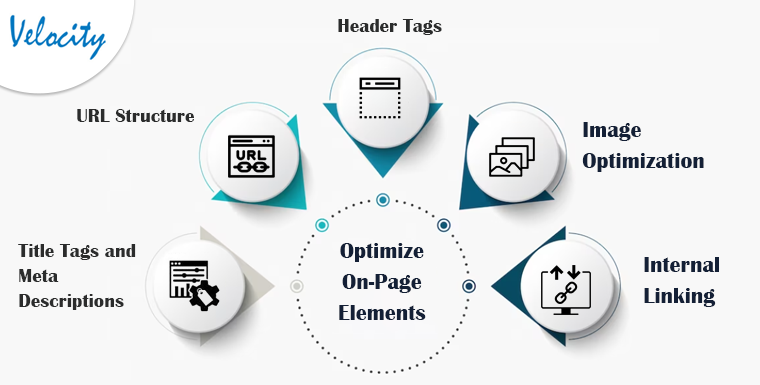
On-page SEO plays a crucial role in improving visibility.
Focus on optimizing the following elements:
A. Title Tags and Meta Descriptions
Optimize each page with:
- Targeted keywords
- Clear and persuasive descriptions
- Proper character length
Well-written meta tags improve click-through rates.
B. SEO-Friendly URL Structure
Create clean URLs that:
- Include descriptive keywords
- Avoid unnecessary parameters
- Are easy to read
Example:yourstore.com/mens-running-shoes
C. Header Tags (H1, H2, H3)
Use structured header tags to:
- Organize content
- Highlight important keywords
- Improve readability
Each page should have one primary H1 tag.
D. Image Optimization
Optimize images by:
- Using descriptive file names
- Adding relevant alt text
- Compressing images for faster loading
E. Internal Linking
Build a logical internal linking structure to:
- Help search engines crawl your site
- Improve navigation
- Increase time spent on site
III. Focus on Content Optimization
High-quality, keyword-rich content is essential for SEO success.
A. Product Descriptions
Write:
- Unique and original descriptions
- Keyword-optimized content
- Clear product benefits and features
Avoid duplicate manufacturer descriptions.
B. Category Pages
Optimize category pages with:
- Informative descriptions
- Relevant keywords
- Clear navigation elements
Category content improves ranking potential.
C. Blog Integration
Leverage PrestaShop’s blogging features to publish:
- Industry insights
- Buying guides
- Product comparisons
- How-to articles
Regular blogging improves keyword targeting and internal linking opportunities.
IV. Ensure Site Performance and User Experience

Search engines prioritize websites that offer excellent performance and user experience.
A. Improve Page Loading Speed
- Compress images
- Minify CSS and JavaScript
- Enable browser caching
- Use a reliable hosting provider
B. Mobile Optimization
Test your PrestaShop theme on multiple devices to ensure:
- Fast loading
- Proper layout rendering
- Smooth checkout experience
C. User-Friendly Navigation
Implement:
- Clear menu structures
- Breadcrumb navigation
- Search functionality
Easy navigation improves conversions and SEO metrics.
V. Monitor and Analyze SEO Performance
Continuous monitoring ensures long-term SEO success.
A. Track Keyword Rankings
Use SEO tools to monitor targeted keyword positions and refine strategies accordingly.
B. Analyze Website Traffic
Leverage analytics tools to measure:
- Organic traffic
- User behavior
- Bounce rate
- Conversion rates
C. Fix Technical Issues
Regularly audit your site to identify and resolve:
- Broken links
- Duplicate content
- Crawl errors
- Missing meta tags
SEO is an ongoing process that requires consistent optimization.
VI. Frequently Asked Questions About PrestaShop SEO
What are PrestaShop 9 SEO improvements?
PrestaShop 9, released in 2025 and stabilising through 2026, ships with several native SEO improvements over PrestaShop 8.x. The headline changes: cleaner canonical handling on faceted-navigation URLs (less manual configuration needed to prevent index bloat), native support for modern image formats (WebP and AVIF) without requiring third-party modules, improved Core Web Vitals defaults in the new Hummingbird and Classic theme lines, and refreshed Product schema output that includes brand, GTIN, and AggregateRating fields more reliably. The migration from PrestaShop 8.x to 9 typically delivers a noticeable Core Web Vitals improvement and reduces ongoing SEO module dependencies — but URL structure changes between versions still require careful redirect mapping during the upgrade.
How does SEO internal linking work in PrestaShop?
Internal linking in PrestaShop happens at four layers: the main navigation menu (header links to top categories), the footer block (links to CMS pages and key category pages), category-to-product links (automatic via product listings), and content-driven links (manually added inside product descriptions, category descriptions, and CMS pages like blog posts). The SEO impact compounds: category pages link to subcategories and top products, products link to related products and parent categories, and blog or content pages link to relevant categories and products. The most common gap on PrestaShop stores is missing content-driven internal links — category descriptions are often left as a single sentence, missing the chance to link to high-value subcategories or new-arrival product groups. Adding 2-4 contextual links inside each major category description is the highest-leverage internal-linking improvement available in PrestaShop SEO.
Should I use meta keywords in PrestaShop?
No — meta keywords have not been a Google ranking signal since 2009, and they remain ignored in 2026. PrestaShop admin still includes a meta keywords field on products and categories because the field is harmless to keep in the database, but populating it has no SEO benefit. Time spent filling meta keywords would be better invested in meta titles (still a primary ranking signal), meta descriptions (drives click-through rate from search results), and product description content (the highest-leverage on-page SEO element). Some PrestaShop themes still display meta keywords in the page <head>; this also has no SEO impact but does reveal your keyword strategy to competitors viewing your source code, which is a minor reason to clear them.
Is PrestaShop good for SEO compared to Magento or WooCommerce?
PrestaShop sits in the middle of the three on SEO. WooCommerce wins for content marketing tightly integrated with ecommerce because WordPress is underneath — the WordPress blog and ecommerce live in one stack. Magento wins for very large catalogues, multi-store, and complex faceted navigation but requires more SEO configuration work to get right out of the box. PrestaShop ships closer to SEO-ready than Magento, has better native multi-language and multi-currency SEO than WooCommerce, and is generally faster to operate than Magento for mid-market stores. For European stores selling across multiple languages, PrestaShop is often the strongest SEO platform of the three. For content-heavy stores or stores with heavy blog investment, WooCommerce wins. For very large complex catalogues, Magento remains the right choice.
How long does PrestaShop SEO take to show results?
Technical SEO fixes — canonicals, schema markup, sitemap, robots.txt, page speed — produce measurable Search Console signals in 2-6 weeks. On-page content improvements (product descriptions, category content, internal linking) compound over 3-6 months. Off-page work (backlinks, brand mentions) and authority-building take 6-12 months to translate into ranking moves. New PrestaShop stores typically see meaningful organic traffic 4-8 months after launch with consistent SEO investment; established stores see ranking improvements within 2-4 months of audit-driven SEO work.
Can I do PrestaShop SEO myself or do I need a developer?
Much of PrestaShop SEO is admin-panel work that does not require a developer: meta titles and descriptions, category content, image alt text, basic canonical settings, sitemap generation, and content updates. Developer work is required for: theme-level Core Web Vitals optimisation (especially LCP and CLS fixes), custom schema markup on theme templates beyond the native Product schema, faceted navigation SEO tuning, multi-store or multi-language SEO configuration, complex URL rewrites, and integration with third-party SEO modules. For most small-to-medium PrestaShop stores, an SEO specialist can handle 70-80% of the work in the admin; a developer is needed for the remaining technical layer. See our PrestaShop development services for technical SEO support.
Conclusion
Optimizing SEO in PrestaShop themes is essential for improving search engine visibility and driving organic traffic to your online store.
By:
- Choosing an SEO-friendly theme
- Optimizing on-page elements
- Improving content quality
- Enhancing performance and user experience
- Continuously monitoring SEO metrics
You can achieve higher rankings, increased organic traffic, and improved conversions.
Stay updated with the latest SEO trends and algorithm updates to maintain a competitive advantage.
For further information or queries related to optimizing SEO in PrestaShop themes, please contact [email protected].