
Optimizing SEO in PrestaShop Themes: Best Practices for Search Engine Visibility
Download MarkDown

In today’s competitive online marketplace, search engine visibility plays a critical role in the success of any eCommerce website. PrestaShop, a widely used open-source eCommerce platform, offers a variety of customizable themes to build visually appealing online stores.
However, to maximize traffic and conversions, it is essential to optimize your PrestaShop theme for SEO (Search Engine Optimization). In this blog, we will explore best practices to improve search engine rankings and drive organic traffic to your PrestaShop store.
I. Choose an SEO-Friendly PrestaShop Theme
Selecting a well-optimized theme is the foundation of effective SEO in PrestaShop.
Key Factors to Consider:
A. Responsive Design
Ensure your theme is fully mobile-friendly and provides a seamless experience across desktops, tablets, and smartphones. Mobile responsiveness directly impacts rankings and user engagement.
B. Clean and Optimized Code
Choose themes built with clean, lightweight, and optimized code. Clean coding improves:
- Page loading speed
- Search engine crawling efficiency
- Overall site performance
C. Structured Data Markup
Select themes that support structured data (schema markup). This helps search engines better understand product information and display rich snippets in search results.
II. Optimize On-Page Elements
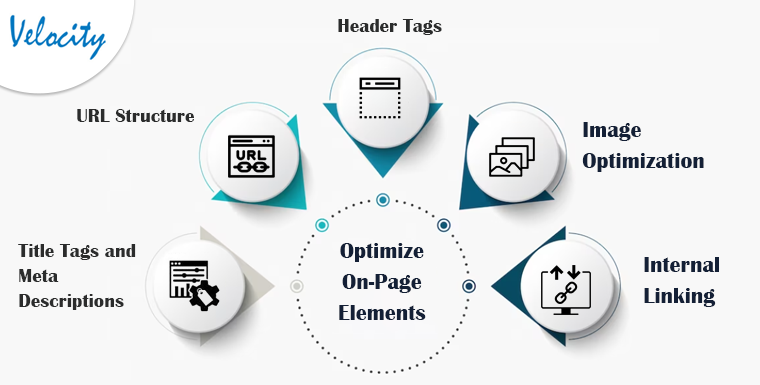
On-page SEO plays a crucial role in improving visibility.
Focus on optimizing the following elements:
A. Title Tags and Meta Descriptions
Optimize each page with:
- Targeted keywords
- Clear and persuasive descriptions
- Proper character length
Well-written meta tags improve click-through rates.
B. SEO-Friendly URL Structure
Create clean URLs that:
- Include descriptive keywords
- Avoid unnecessary parameters
- Are easy to read
Example:yourstore.com/mens-running-shoes
C. Header Tags (H1, H2, H3)
Use structured header tags to:
- Organize content
- Highlight important keywords
- Improve readability
Each page should have one primary H1 tag.
D. Image Optimization
Optimize images by:
- Using descriptive file names
- Adding relevant alt text
- Compressing images for faster loading
E. Internal Linking
Build a logical internal linking structure to:
- Help search engines crawl your site
- Improve navigation
- Increase time spent on site
III. Focus on Content Optimization
High-quality, keyword-rich content is essential for SEO success.
A. Product Descriptions
Write:
- Unique and original descriptions
- Keyword-optimized content
- Clear product benefits and features
Avoid duplicate manufacturer descriptions.
B. Category Pages
Optimize category pages with:
- Informative descriptions
- Relevant keywords
- Clear navigation elements
Category content improves ranking potential.
C. Blog Integration
Leverage PrestaShop’s blogging features to publish:
- Industry insights
- Buying guides
- Product comparisons
- How-to articles
Regular blogging improves keyword targeting and internal linking opportunities.
IV. Ensure Site Performance and User Experience

Search engines prioritize websites that offer excellent performance and user experience.
A. Improve Page Loading Speed
- Compress images
- Minify CSS and JavaScript
- Enable browser caching
- Use a reliable hosting provider
B. Mobile Optimization
Test your PrestaShop theme on multiple devices to ensure:
- Fast loading
- Proper layout rendering
- Smooth checkout experience
C. User-Friendly Navigation
Implement:
- Clear menu structures
- Breadcrumb navigation
- Search functionality
Easy navigation improves conversions and SEO metrics.
V. Monitor and Analyze SEO Performance
Continuous monitoring ensures long-term SEO success.
A. Track Keyword Rankings
Use SEO tools to monitor targeted keyword positions and refine strategies accordingly.
B. Analyze Website Traffic
Leverage analytics tools to measure:
- Organic traffic
- User behavior
- Bounce rate
- Conversion rates
C. Fix Technical Issues
Regularly audit your site to identify and resolve:
- Broken links
- Duplicate content
- Crawl errors
- Missing meta tags
SEO is an ongoing process that requires consistent optimization.
Conclusion
Optimizing SEO in PrestaShop themes is essential for improving search engine visibility and driving organic traffic to your online store.
By:
- Choosing an SEO-friendly theme
- Optimizing on-page elements
- Improving content quality
- Enhancing performance and user experience
- Continuously monitoring SEO metrics
You can achieve higher rankings, increased organic traffic, and improved conversions.
Stay updated with the latest SEO trends and algorithm updates to maintain a competitive advantage.
For further information or queries related to optimizing SEO in PrestaShop themes, please contact [email protected].