Integrating Third-Party Modules into PrestaShop Themes
Download MarkDown
PrestaShop is an open-source e-commerce platform that offers a wide range of features to help businesses in creating online stores. The platform is based on PHP and offers incredible usability. Furthermore, one of the key benefits of PrestaShop is the ability to customize the platform with third-party modules and extensions. These PrestaShop modules can add additional functionality to the store and can enhance the customer experience. Another term for the PrestaShop module is officially known as add-ons.
On top of that, one of the major advantages of PrestaShop modules is that it requires literally zero coding or technical skills.
Steps to Integrate Third-Party Add-ons into PrestaShop Themes
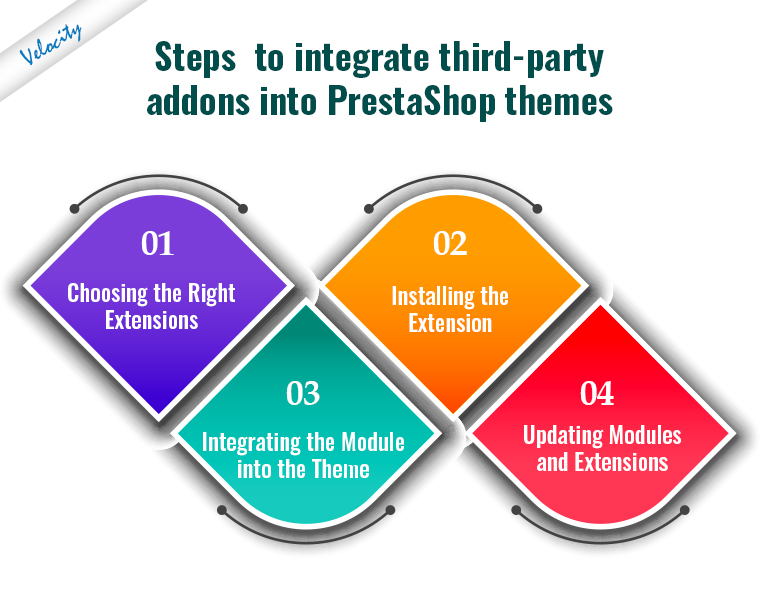
1. Choosing the Right Modules
Before integrating third-party modules and extensions into PrestaShop themes, it’s important to choose the right ones. There are thousands of plugins available for PrestaShop, and not all of them are compatible with all themes.
Moreover, it is also important to check:
- Customer reviews
- Customer support quality
- Compatibility with the current PrestaShop version
- Compatibility with your store theme
Some of the most popular modules for PrestaShop include:
- Payment gateways
- Shipping modules
- Social media integrations
- Marketing tools
Once the appropriate module or extension has been selected, it’s time to integrate it into the theme. Moreover, in case you are having compatibility or PrestaShop installation-related concerns, you can also find us at [email protected].
2. Installing the Plugin
The first step in integrating a third-party module or extension into a PrestaShop theme is to install it on the website.
You can do this by:
- Navigating to the “Modules and Services” section in the PrestaShop dashboard
- Selecting “Add a new module”
- Uploading the module from your computer
- Installing it from the PrestaShop marketplace
Or, if you are getting any issues installing the module via the admin panel, you can simply drag and drop the module files into your store’s FTP.
The module will appear in the “Modules and Services” section of the dashboard once installed.
3. Integrating the Module into the Theme

Integrating a module or extension into a PrestaShop theme involves adding it to the appropriate location in the theme files.
Most modules come with installation instructions that explain where to add the code. Alternatively, a developer familiar with PrestaShop themes can add the code. At Velsof, with 13+ years of PHP development experience, we also offer PrestaShop theme and module development services at very reasonable prices.
Before integrating the module into the theme, it’s important to make a backup of the website files and database. This ensures that you can undo any changes later if necessary.
Once the module or extension is installed on the store theme, you should test it thoroughly to ensure that it’s working correctly. This includes testing any new functionality added by the module or extension to ensure that it doesn’t conflict with existing features on the website.
Along with this, you can also test your store’s basic functionalities to ensure that everything is working safely and soundly.
4. Updating Modules and Extensions
Finally, it’s important to keep third-party modules and extensions up to date. This ensures that they continue to work correctly with the PrestaShop theme.
To update a module or extension:
- Navigate to the “Modules and Services” section in the PrestaShop dashboard
- Select the “Update” option for the module
It’s important to read the release notes for the update before installing it. This ensures that the module is compatible with the current PrestaShop version.
Integrating Temu with PrestaShop: A Special Case for 2026 Marketplaces
Temu has emerged as one of the most-searched marketplace integrations for PrestaShop merchants in 2026. The use case is two-directional: merchants want to list PrestaShop catalog products on Temu to reach Temu’s buyer base, and they want to pull Temu order data into PrestaShop for unified fulfillment. Unlike Amazon or eBay, Temu does not yet ship an official PrestaShop module — integration relies on third-party connectors and direct API work.
The technical path that works in 2026: use Temu’s Open Platform API for catalog sync and order ingestion, build a custom PrestaShop module that exposes a webhook endpoint, and map Temu’s category taxonomy to your PrestaShop categories using a translation table. Two practical considerations apply:
- Category mapping is the longest pole: Temu’s taxonomy has roughly 6,000 leaf categories. A direct mapping spreadsheet from your PrestaShop categories saves weeks of work versus letting Temu’s auto-classifier guess.
- Pricing rules need a markup layer: Temu’s pricing pressure means you almost always want a category-specific markup function, not a flat margin. Build this into the integration module so finance teams can tune it without redeploying.
- Order webhook reliability: Temu retries failed webhooks for 24 hours then drops them. Idempotency keys and a fallback poll-every-15-minutes job catch any orders that slip through.
- Returns policy alignment: Temu’s 90-day no-questions return policy is stricter than most PrestaShop merchants run. Most integrations expose this as a per-product flag so you can opt specific SKUs out of Temu listings entirely.
For most mid-sized merchants, a third-party connector from the PrestaShop Marketplace (or a custom module built on top of Temu’s API) is the right answer rather than rolling your own integration end-to-end. Budget two to four weeks for first-version deployment and another two for catalog cleanup before you flip the listings live. We have integrated PrestaShop stores with Temu, Amazon, eBay, and Walmart marketplaces — reach out via our PrestaShop development page if you want to discuss a specific scope.
Conclusion
Integrating third-party modules into PrestaShop themes can enhance the functionality and customer experience of an online store. Before selecting and integrating a module or extension, it’s important to install updates to ensure that it continues to work correctly with the PrestaShop theme.
By following these steps, businesses can customize their online stores to meet their specific needs and provide a better experience for customers.
For any queries related to PrestaShop themes, third-party modules, or PHP development, feel free to contact [email protected].